
With its latest update for Windows 11, codenamed KB5089573, Microsoft has finally started to fully roll out something that it began late last year, and something that phones have supported for even longer. It’s a Bluetooth feature called Shared Audio, and as long as everyone’s hardware ticks off the right boxes, you’ll be able to cast music and the like to two separate devices.
I always keep Windows on my main PC fully up-to-date, for work reasons, but I wasn’t aware that Microsoft had finally rubberstamped the new feature until I read about it at Windows Latest. Unless you had a PC from a very narrow list of options and used a beta version of Windows, there has been no way to have more than one headset playing the same Bluetooth audio stream on a Microsoft-based computer.
That changed last year, when Redmont released a preview of Shared Audio, but now every Windows 11 user gets it. Well, you might have to wait a little while, as Microsoft does have a habit of dragging its heels with rolling updates, but with luck, your PC should be good to go if you have the latest update.
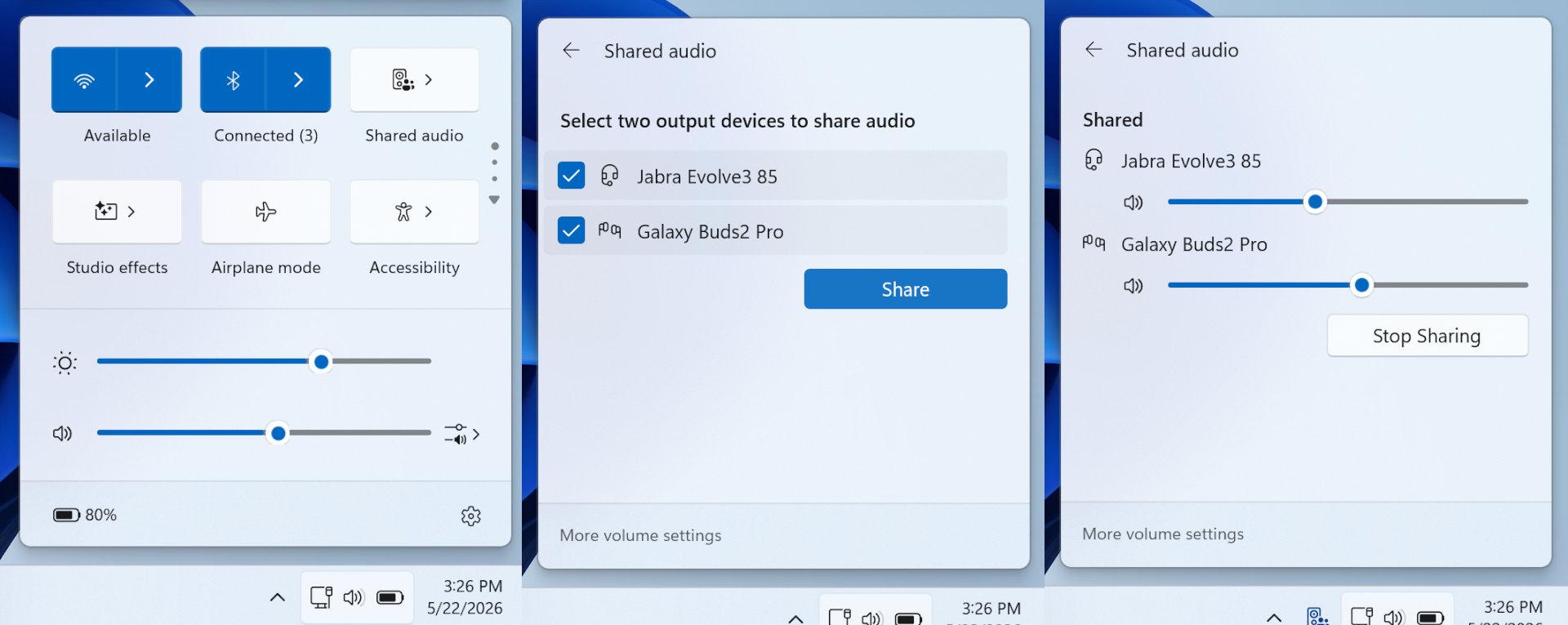
Basically, you just need to have two Bluetooth audio devices (headsets, headphones, earbuds, etc) connected to the same PC, and you should see the option to enable Shared Audio in the Quick Settings dropdown menu (just to the left of the clock in the system tray).
However, this will only be the case if all of the following are true: (1) The PC is using Windows 11 v26200.8524; (2) the PC supports Bluetooth LE audio broadcast; (3) both audio devices support Bluetooth LE Audio; (4) both audio devices have “Use LE Audio when available” enabled in Windows’ Bluetooth options.
Ordinarily, at this point, I’d be showing you various images from my own PC as to how to check all of these things, where to look, and so on. However, despite being all updated and with two Bluetooth LE Audio devices connected, my Windows 11 install doesn’t have the Shared Audio feature yet. The images I am showing are those produced by Microsoft.
Truth be told, it’s not something I’d personally use very much anyway. Phones have been able to do this for a good while now, and in the rare circumstance where I’d want to share music or a video audio track with another person, I’m most likely to be using a phone to do this.
But if you like to sit with a buddy or significant other, and watch a movie together on a laptop, at least there’s now a chance that you won’t need to share earbuds or suffer the tinny sound from the PC’s rubbish speakers. It’s a neat feature to have, even if we’ve had to wait far too long for it.